Thursday, October 3, 2019

Dominos Offer by amazon UPI 2019


First Of All Just Open Amazon App & Set Your UPI Address & Send ₹250+ To Any UPI ID.

2. You Will Receive Domino’s & Bookmyshow 50% Cashback Upto ₹150 Coupon To Claim (You May Get Bookmyshow Coupon Only , Then Try In Another Account)

Offer Source – Amazon Send Money Offer
Amazon Send Money Fest - Dominos Offer

3. You Will Receive Email To Claim The Domino’s Coupon Or You Can Claim Coupon From – Amazon App >> Click On Offers On Home Page >> Click On Your Rewards >> Collect Your Unlocked Offers

4. Go To Domino’s From Same Link By Clicking “Order Now”

Domino's Discount Offers

5. Now Add Anything Worth ₹400 In Your Cart

6. Click On Check Out & Apply Coupon – FREEDOM100 (Make New Account if Coupon Showing Error) – Not Valid On Everyday Value

Domino's Discount Offers

7. You Will Get Instant ₹100 Discount.

8. Now Pay Using Amazon Pay For Instant 50% Cashback Upto ₹150.

Final Amount –
₹400 Pizza – ₹100 (FREEDOM100) – ₹150 (50% Back Amazon) = ₹150 Final

₹500 Pizza – ₹100 (FREEDOM100) – ₹150 (50% Back

Prezi Premium account 2019

Prezi Premium


BIN: 534628xxxxxxxxxx

IP: USA - CP: 10080

LINK: https://prezi.com/pricing/

Best CC checker and generator from bins list

Free Spotify Premium Accounts and Passwords October 2019


UpFree Spotify Premium Accounts 2019 – Music is a number 1 source of entertainment for many people. listening to music makes your daily life really enjoyable. When you are listening to the song your favorite artists’ music.

Here is much affordable streaming and downloading platforms available nowadays. you can do that easily. Here is one of the Best and popular music platforms is Spotify. if will are interested in learning the easiest ways to get free Spotify premium accounts October 2019.

Free Spotify Premium Accounts October 2019


Spotify is one of the best music Playing platforms which is free for everyone. You will do not have to pay a monthly subscription fee for this app. However, for you just upgrade your accounts into premium ones, they will get many benefits.
This is a 100% easy way to get free Spotify premium accounts 2019. you should enjoy the premium features will only for 30 days. it is the best way to try out these features. Here are steps to try out the temporary upgrade.
  • Access Spotify’s website on your phone https://www.spotify.com/premium/.
  • In the middle of the webpage, here is the button of “Start Free Trial”. Click on the button.
  • Enter your account information. (Email and Password)
  • Enter your Debit card information on the payment page.
  • Click on a button (Free Trial Now).
  • Then your free Premium features trial will start immediately.
Before entering your card information, you should watch the trial expiry date. If you go past that date, Then Spotify Team will withdraw subscription money from your account. Follow steps (Cancel your premium trial before you get charged).

  • Access Spotify’s website on your phone https://www.spotify.com/premium/.
  • Enter your login information.
  • Go to “Profile” Click on “Account”.
  • Select “Manage Plan” on the Account tab.
  • Select “Change or Cancel”.
  • Under a heading called “Change plans”, you should select “Cancel Premium”.
  • Then click on “Yes, cancel”.

Spotify Premium Accounts :fire:


lindalavin@verizon.net:ericzack123
wiekewiertsema93@gmail.com:maudje123
w.zykubek@gmail.com:ver2689ver
zeynep.albeniz@gmail.com:050500216
yasminahmed82@gmail.com:zebra2326
jordkend@earthlink.net:Twoboys1

Tidal Premium Accounts October 2019


Tidal Premium Accounts :fire:


TIDAL Premium Account: After Spotify, we are Sharing you TIDAL. Yes, this time we are sharing TIDAL Premium Account to you and its also absolutely free, you don’t have to pay anything. TIDAL is a global streaming service, available in 52 countries. Tidal has 40 million songs in its catalog and nearly 130 000 high-quality videos. The service offers high-fidelity CD sound quality, high-quality video, expertly curated content and editorial, and unique experiences.

TIDAL is a global, experiential, entertainment platform built for fans, directly from artists around the world. TIDAL members enjoy exclusively curated content that directly connects artists with their fans in multiple ways. The service offers high-fidelity, CD sound quality music, high-resolution video, an opportunity to discover new artists via TIDAL Discovery, and unique experiences via Tidal X. TIDAL offers a monthly subscription with a 30-day free trial, the Premium tier at $9.99 and the HiFi tier at $19.99. See www.tidal.com for more consumer info.
TIDAL will work on most smartphones, tablets and personal computers. The TIDAL platform also supports a wide range of network players including Sonos, Bluesound, Linn, Auralic, Mirage, Squeezebox, Amarra, McIntosh, Wadia, Electrocompaniet, Meridian and Lode. Tidal Music is the lossless music streaming service that hi-fi people have been waiting for. Whether your ears care about the increase infidelity, and whether you have the headphones and playback devices to make the best of it, only you can tell. But with a trial offer for everyone, there’s no reason not to at least give it a try.
The 10 Things You Need to Know about TIDAL

+++TIDAL has two pricing tiers: either $9.99 or $19.99 a month when you register at TIDAL.com. Both pricing levels come with the same access to exclusive content and experiences, and the $19.99 tier has the added benefit of high-fidelity sound, delivering the music to your ears the way the artists and producers intended it to be heard. There is no compression of the files, and the music is CD-level quality. TIDAL provides a 30 day free trial period to all new customers on both subscription tiers.
+++TIDAL gives its members access to exclusive music, videos, tickets, merchandise
and experiences that you can’t find anywhere else.
Through Soundiiz.com you can import your playlists from any other streaming service directly into your TIDAL account.
+++TIDAL has a world-class editorial team regularly delivering articles and interviews across all genres that deliver intimate and revealing looks into your favorite artists, as well as artists you may end up reading about for the very first time.
With a simple swipe, you can take your music offline, which allows you to continue to listen to your favorite music on TIDAL even when you’re not connected to the Internet or a mobile network.
The playlists on TIDAL are tailor-made for listeners, expertly curated by team, and not by a computer algorithm. TIDAL also give you access to many exclusive playlists created by artists, athletes, journalists and the like, which will give you a look into their world and experience the music that they listen to and love.
+++TIDAL X: A program that supports artists by giving them a platform to connect with their most loyal fans around the globe exclusively through TIDAL. TIDAL X will give fans an opportunity to connect with their favorite artists in an unlimited number of ways, witnessing unique experiences that no one outside of TIDAL will see. It could be an intimate performance, a meet-and-greet, a dinner, etc. – the possibilities are endless. And these TIDAL X experiences will showcase and support artists of all levels, no matter how big or small.
+++TIDAL RISING: A program dedicated to artists from around the globe who have passionate fan bases and are ready to broaden that base to a wider audience. TIDAL RISING was built to help accelerate the exposure that artists who are on the verge of breaking big need to gain through exclusive features to TIDAL subscribers.
+++TIDAL Discovery: Some of the best music in the world is the music we never hear because sometimes the most talented artists don’t get the break they deserve. TIDAL Discovery was built to give them that break. This is an area within TIDAL that is exactly what the name suggests – a place for TIDAL subscribers to exclusively discover the music of tomorrow so that it becomes their music of today.
+++TIDAL is just getting started, and how TIDAL looks and feels now is just the beginning. As we move forward TIDAL will evolve and expand in new and exciting ways, delivering fans access to music and experiences unlike any other service can deliver.
What Is The Difference Between Normal, High, And HiFI?

HiFi – Lossless FLAC: 16bit / 44.1 KHz 1411Kbps FLAC Files on average will consume about 10MB of data per minute of content. For a 4 minute track, ~ 40 MB of Data that is either used when streaming or storage space required.

High – AAC 320 Kbps: AAC files found under the high setting on average will consume about 2.4 MB of data per minute of content. For a 4 minute track, ~ 9.6 MB of data that is either used when streaming or storage space required.

Normal – AAC+ 96 Kbps: AAC+ tracks found in the normal setting on average will consume about 720 KB of data per minute of content. For a 4 minute track, ~ 2.88 MB of data that is either used when streaming or storage space required.
Note: Do Not Change the Password For Longer Use and Let Other Use Too

We will try to update accounts so as to ensure fresh and active premium accounts


cja716@gmail.com:joedirte716
keyon.ashe@gmail.com:loveyou31
jdussan1984@gmail.com:colombia84
lbethtaylor@gmail.com:anderson04
amy.c.rimmer@gmail.com:rockstar06

Saturday, September 21, 2019

SPOTIFY premium account id and passwords free ACCOUNTS

SPOTIFY ACCOUNTS 


If you are a music lover then surely you will know many platforms to listen songs of your favourite artists. Among all the music streaming platform that exists, the most popular is Spotify, were the most top rated artist share their music.
However Spotify has two plans, free and premium: The basic plan allows you to listen any song or artist but with audio ads and limited skips on songs, while the Spotify Premium plan has no ads or restrictions.
The premium price is $9.99 per month, definetly not worth if you don’t listen a lot of songs. This is why we will share many Spotify Premium accounts username password 2019.

Free Spotify Premium Account & Password 2019

The reason of why Spotify is so popular it’s because most of artists are present in there, plus you can create playlists easily. One of the most loved features of this app is basically the facility to find new music based on your interests or by selecting a category.
The free plan has strict limitations compared to the premium suscription, first of all, on the free plan you can only skip 6 tracks per hour, and when these are used it will play random music from the playlist you are. This may be annoying for many users.
spotify accounts for free
Spotify Premium users love the hability to download songs to your phone, and listen it on offline mode, without internet. If you keep reading we will give you a Spotify premium account username and password, and some tricks that may be useful.

How to get a Free Spotify Premium Account & Password?

There are many ways to get a working Spotify Premium Account Username for free. Most of them require some time, we will show the methods here, but if you want to save time, just access our list of Spotify premium accounts.
If you consider the Premium subscription expensive, then this tutorial is for you. If paying 9 bucks montly isn’t a problem then we recommend supporting Spotify and their artists.

Searching on the web

One of the tricks to find accounts is searching on the web search engine, you can find there many accounts, however not all accounts listed on the top position websites may be working. The reason is that probably these accounts were taken by other persons.
person searching on the web
We recommend searching for the term spotify free accounts and filter by date on google, this will show you the latest results indexed with the most fresh accounts. It increases the success of getting a working account.
Another tip is to keep checking on websites that update their lists frequently, and use one of the accounts shared. On our website we update our list with fresh accounts every week.

Login with Username and Password

After you found several websites with lists of accounts now you need to prepare to check which ones work. To do this open your web browser on your computer and be ready to copy and paste.
spotify premium login free
Scroll down to find the list with free spotify accounts (login and password)
We recommend using your computer to do this because it is faster to try to log in many times than mobile. Collect all the accounts and start copying and pasting then click login on spotify website.
Probably most of accounts will not work, but eventually you will find one working with all the Premium functions unlocked, this is why is very important to keep checking on websites that update their content.

Listen Music Without Limits

After you have found a working Spotify account, log in on your mobile and start enjoying all the features. With time you will see how cool it is, and what’s the difference between the free account and the premium.
If for some reason your account stops working, just repeat the process again. Or you can compilate many and replace them when one is not working.

No more ads

With spotify premium account there are not ads, something to be thankful because on free plan it is disturbing when you are listening to music and suddently your music stops because an ad.
adblock for spotify remove ads
No need to worry anymore about ads, now with spotify premium account username and password 2018 you can list all the music without ads and unlimited skips.

Unlimited Skips

The free spotify version was limited to 6 skips per hour, but with premium you can skip unlimited times, and select individually the music you want to listen to. Even you can listen the same song again and again.

Offline mode

Spotify is an online platform, however with premium you can download songs on your device and play ir everywere without being connected to the internet, this means you can play songs also on airplane mode.
 Updated accounts:

mathieuhurtubise1@hotmail.com:hockeyman64
gnsa20@hotmail.com:gnsa78920
d4nny11@hotmail.com:Pitter11
camfxd@gmail.com:sam08mie
sascha.salje@gmx.de:dortmund13
erikrogalsky12@gmail.com:rogalsky12
luiz.afonso_jr@uol.com.br:la051935
bluto00000@gmail.com:monnhann1
bujieboo1111@gmail.com:sunny23608
yejunkwon@gmail.com:Ygun5571

Free Spotify Premium Accounts List & Passwords 2019

We have many accounts to share with you, most of them have been recently created, find username and password. The list we compilated is below, all you need to do is just login.
UsernamePasswordUpdated
foxxwof87@gmail.comchiron-3January 2019
jasongarci4@gmail.com7171jasonJanuary 2019
nancythomasin@yahoo.ind7kh93mzJanuary 2019
bobbybrownkk@yahoo.combbbkk1982January 2019
arta.kj@gmail.commichelle123January 2018
razergameryt@gmail.comminecraftproxJanuary 2018
clairesmith95@outlook.combearlove95January 2018
snakewarriorla@gmail.compiterpiterJanuary 2018
dylancastro_@hotmail.comdylanmusicJanuary 2018
Our accounts are being updated every week, but the accounts on the tables are not all we have. If you want to access +1000 spotify premium working accounts you can access below press OPEN:

As you may know, spotify accounts can be used by many persons at the time, we contacted users who have premium and requested their login credentials. Just access our full list, most of the accounts are working.

Spotify Premium Account Generator 2019

Have you ever heard of a spotify username and password generator? We created one, but, you may wonder how it works?
As we mentioned before we own a huge list of Spotify premium accounts and passwords, but there are accounts on our list that are just being used by other persons. Here is where the generator helps picking a working account from the list, without having to access it.
Just click generate and in 5 seconds you will have the login credentials composed by email and password. Copy and paste the details to access the premium account.
  • Open the generator

Open our online generator you can find on the open button. It’s quite easy, the page will load super fast since it is light-weight.
  • Press “Pick Spotify Premium Account”

Just click on the button that says “Pick Spotify Premium Account” and the generator will start checking the accounts of our list.
  • Copy and Paste Username and Password

After the process, that takes around 5 seconds, you will have an email and password, just copy it and paste to Spotify. Hooray! it works.

Free Spotify Premium Offline

Offline mode allows you to download your favourite tracks to listen later or without internet connection. Perfect if you are traveling or without internet data, all the accounts we provide have this function enabled.
To use it launch the Spotify App and go to a song or playlist, switch on Download on the top right. The full playlist or track will start to download immediately.

Alternatives to Spotify Premium

There are many alternatives to Spotify, most of them have a mobile app to listen the music on the go, we will present here the most popular ones.
  • Youtube Music
  • Apple Music
  • Soundcloud
  • Deezer
  • Google Play Music

Download DownCloud++ For iOS Install DownCloud on iPhone/iPad

If you want to know How to get DownCloud Install on iOS 12+/11+/10+/9+/8+/7+ and also want to get DownCloud Download For iPhone, iPad that too Without Jailbreaking, then you are in the right place to get Download Songs Directly from SoundCloud without any Cost or Jailbreak.


Read More About DownCloud:
Hey Guys, We are Once Again with another Interesting Tweak for IOS Music Lovers Named as DownCloud for iOS 12+/11/10+/9+/8+/7+ on iPhone, iPad without Jailbreak. We know the Music is the Best Entertainment source which refreshes your Mind form Stress and other Thoughts. When you are Listening to Music from SoundCloud or Web-sourced there is no way available to make offline your favorite songs. Similarly, the iOS user always needs to Download Songs only via iTunes because which doesn’t Offer any Direct Download facility.


  • Note: Actually, this app is not available on the Apple AppStore, so you have to Download and Install it from the third-party sources. Don’t bother about that here in this article, I am going to give you the direct link to Download DownCloud++ iOS.
Thankfully, The DownCloud supports Direct the Download Option and there you can simply Choose a song on SoundCloud App and simply Make Offline onto your iDevice Even without Need of iTunes Software and Computer. So Just Read the Entire Article and then Know Its Complete Download and Install process without Jailbreak.

DownCloud-Preview
DownCloud Preview

What is DownCloud?

DownCloud is an App runs very similarly to the popular SoundCloud Apple Tweak,  And which offers huge Range of songs from Different Categories without any Cost. Basically, the DownCloud++ App Takes Music Content from SoundCloud and allow you to stream music on your iDevice.
  • Disclaimer: We at OM Geeky write this article only for education purposes, so never ever misuse this article for commercial purposes. If you use this article for commercial purposes, then you may face some violations from the original app developers.
But the Most interesting feature on DownCloud is it Offers a Download option for Offline Making. And you can listen to those Offline Songs later when you’re in free time. Similarly, it offers a Search box and with the Amazing feature, you can find particular sings by simply Typing of its Name.

About DownCloud++

App Info:
  1. App Name: DownCloud++.
  2. Category: iOS Music Streaming App.
  3. Compatibility:
iDevicesiPhone 8, iPhone 8+, iPhone X, iPhone 7, iPhone 7S, iPhone 6S Plus, iPhone 6S,iPhone 6Se, iPhone 6 Plus, iPhone 6, iPhone 5S, iPhone 4S, iPad Air 2, iPad Air, iPad Mini 3, iPad Mini 2, iPad Mini, iPod Touch
iOS VersionsiOS 13 Beta, iOS 12, iOS 12 Beta, iOS 11, iOS 11.0, iOS 11.0.2, iOS 11.0.3, iOS 11.1, iOS 11.1.1, iOS 11.1.2, iOS 11.2, iOS 11.2.1, iOS 11.2.2, iOS 11.2.5, iOS 11.2.6, iOS 11.3, iOS 11.3.1, iOS 10, iOS 10.0, iOS 10.0.1, iOS 10.0.2, iOS 10.0.3, iOS 10.1, iOS 10.1.1, iOS 10.2, iOS 10.2.1, iOS 10.3, iOS 10.3.1, iOS 10.3.2, iOS 10.3.2, iOS 9, iOS 9.0, iOS 9.0.1, iOS 9.0.2, iOS 9.1, iOS 9.2, iOS 9.2.1, iOS 9.3, iOS 9.3.1, iOS 9.3.2, iOS 9.3.3, iOS 9.3.4, iOS 9.3.5, iOS 8, iOS 8.0, iOS 8.0.1, iOS 8.0.2, iOS 8.1, iOS 8.1.1, iOS 8.1.2, iOS 8.1.3, iOS 8.2, iOS 8.3, iOS 8.4, iOS 8.4.1, iOS 7.0, iOS 7.0.1, iOS 7.0.2, iOS 7.0.3, iOS 7.0.4, iOS 7.0.5, iOS 7.0.6, iOS 7.1, iOS 7.1.1, iOS 7.1.2.

Pre-Requirements:

  • Active internet connection.
  • DownCloud IPA File.
  • The USB Cable to connect iDevices to Windows PC/Laptop.
  • Windows 10/8.1/8/7/ or Mac OS X.
  • Cydia Impactor or Xcode 7 to sideload IPA Files.
  • Need some storage space on your iDevices to Download this app.

Download DownCloud on iPhone/iPad No Jailbreak

DownCloud is a Third-Party Developer Application Not available on Official Apple store due to its Terms, That’s why you can Download and Install this Amazing Music Streaming App from Different sources like Getting from Third-Party App Installers like iOSEmus and ftOS and the second source is side loading IPA onto your iDevice by using Cydia Impactor.

Want to Download this Amazing DownCloud Music App on your iPhone/iPad without any jailbreak or Payment then simply Look the following Installation steps. Ok, before going to Installation Steps, let me tell you some interesting features about this app.

Interesting features of DownCloud++

  1. DownCloud is a friendly App Designed for iPhone, iPad Music Lovers.
  2. Here you can Download All kinds of Music Tracks without any Cost.
  3. Which offers a Search Box, So you can easily find particular Track easily.
  4. It offers Clean UI and Nice User Interface, here You can Download and listen to tracks Directly.
  5. Directly Download songs without paying a single penny.
  6. Clean UI, User-friendly app.
  7. Download Songs to listen when you are offline.

Install DowCloud For iOS 12+/11+/10+/9+/8+/7+ Without Jailbreak

>> Step 1) The DownCloud Music App is Available on other Third-party App stores, And here in this Article we just Done this Install from the iOSEmus App store.

>> Step 2) First of all, Navigate the Below link on inbuilt Safari Browser of your iPhone, iPad Device.
>> Step 3) The iOSEmus App Installer Offers many Tweaks and Apps without any Cost, so there find the DownCloud Music App and click on that.
Click-on-All-Apps-and-Emulators-in-iOSEmus
Click on All Apps and Emulators in iOSEmus
>> Step 4) on the Next screen, Look the Install Button and click on it and wait few seconds.
>> Step 5) Then for Install confirmation, it Raises a Pop-up on screen. Simply Again Click on Install Button.
>> Step 6) Now head back to Home and wait for one to two minutes for its Complete Download and Install. Once the App Installed simply Launch and Download your favorite songs.

Download DownCloud IPA For iOS | Install DownCloud++ on iPhone/iPad

  • For App signing, generally we Need to require App IPA file, So just go head the Below link then Download the DownCloud IPA file into your Windows or Mac Desktop.
  • Now we a Need a Tool for IPA side load, Cydia Impactor is one of the Amazing Tool which Signing your IPA file onto your iPhone, iPad without any jailbreak and Payment. So simply from Below link Download the Cydia Impactor onto your Desktop.
  • With the Help of USB Cable connect your iPhone, iPad to Computer.
Connect-iPhone-iPad-to-PC-Mac
Connect iPhone/iPad to PC/Mac
  • Check Whether your iDevice is connected or not by checking your iDevice model on Cydia Impactor.
Check-your-iDevice-Model-on-Cydia-Impactor
Check your iDevice Model on Cydia Impactor
  • Thereafter open up the Official iTunes.
Launch-iTunes-Software-on-Windows
Launch iTunes Software on Windows
  • Run the Impactor by simply clicking on the Impactor.exe file from the Downloaded Zip file.
  • Head to the IPA file Location simply Drag and Drop into Impactor.
Drag-and-Drop-DownCloud-IPA-onto-Cydia-Impactor
Drag and Drop DownCloud IPA onto Cydia Impactor
  • For IPA Signing Apple ID and Password required, that’s why the Impactor raises a window on the screen.
  • Provide your Apple ID and Password on the Random windows and click on the Start button.
Enter-your-Apple-ID-to-Sideload-DownCloud-IPA
Enter your Apple ID to Sideload DownCloud IPA
  • That’s it, Geek, Now the Impactor starts the DownCloud IPA Signing process and after some, it successfully installs onto your iPhone/iPad.

Fix Untrusted Error

Once the DownCloud++ App installed, you need to Trust its Developer Certificate because which is Third-Part Application not allowed by Official Apple.
>> Step 1) Click on Cancel, when you get the Untrusted Enterprise Developer error pop-up.
Click-on-Cancel-Untrusted-Enterprise-Developer
Click on Cancel
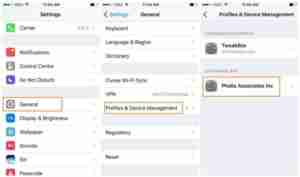
>> Step 2) Now navigate to the Apps Profile Section by following the below Steps.
<= iOS 9"Settings" >> "General Settings" >> "Profile" click on "Trust".
iOS 9+ >="Settings" >> "General Settings" >> "Device Management" >> "Profile" click on "Trust".
How-to-Fix-Untrusted-Enterprise-Developer
How to Fix Untrusted Enterprise Developer
>> Step 3) Here Click on DownCloud app and then Click on the Blue Link.
Tap-on-the-Blue-Link
Tap on the Blue Link
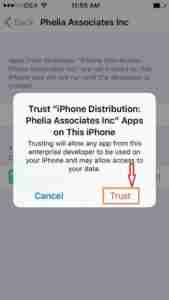
>> Step 4) Finally, Tap on Trust to use this app without any further errors.
Tap-on-Trust
Tap on Trust

Frequently Asked Questions:

Question 1) Is it safe to use DownCloud++?
Answer: Yes, it is 100% safe. This app is a virus friendly app.
Question 2) Can I get recently released Songs and Albums?
Answer: Yes, you can get all recently released songs and Albums for free.
Question 3) Do I need to pay to Download songs?
Answer: Nope, you don’t need to pay a single penny to download any songs.

Conclusion

That’s it, Geek, We hope this Post helps you to Download and Install DownCloud++. And After Install you can Simply Launch and Play your Favorite songs and then Make Offline. If you like this Post then simply share with your loving Buddies.
This article mainly concludes you “How to Download DownCloud++” & “How to Install DownCloud++” on iOS 7+, iOS 8+, iOS 9+, iOS 10+, iOS 11+, iOS 12+ For iPhone, iPad that too Without Jailbreak. If you face any errors or problems while using this app on your iDevices, then share your query with us. We will try our level best to give you a better solution for your query.